Wednesday, February 22, 2017
Xcode Newbie Pitfall
Xcode Newbie Pitfall
As an former ActionScript coder whos try to have fun with Xcode. I love to jump on to some example and get dirty. The fancy part of this fun is many example out there is not working properly due to plenty of deprecated and version conflicted.
Lucky us, we have google and stack overflow to help us get through this mess, but many time I realize that Ive to try many random thread to get working answer (some is in random comment and not mark as an answer!) so I think I better collect my pitfall here for later reference.
Problem : Unknown class MyClass in Interface Builder file.
Cause : rename FooViewController -> BarViewController
Solution : click Foo.xib -> Click at Identity Inspector -> make sure it has correct new name
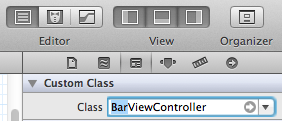
Related : http://stackoverflow.com/questions/6915547/changed-appdelegate-name-causing-app-update-to-crash
Problem : clang: warning: argument unused during compilation: -stdc++
Cause : Tesseract...
Solution : use -lstdc++ instead
Related : http://stackoverflow.com/questions/14855844/errors-in-tesseract-integration-in-ios-app
Related : http://stackoverflow.com/questions/14855844/errors-in-tesseract-integration-in-ios-app
Problem : Xcode hangs "Attaching to (app name)" and throw "invalid host string: localhost" when try to run and connect to simulator
Cause : XAMPP mess with hosts file and Xcode doesnt seem to like it.
Solution : sudo nano /private/etc/hosts and make sure it look like this...
127.0.0.1 localhost 255.255.255.255 broadcasthost ::1 localhost fe80::1%lo0 localhostRelated : http://stackoverflow.com/questions/9832234/xcode-error-failed-to-launch-directory-invalid-host-string-localhost?rq=1
Problem : Cant move/organize/refactoring physical folder like Eclipse.
Cause : Xcode is stupid.
Solution : Bear with it.Related : http://stackoverflow.com/questions/3590380/how-should-i-organize-my-xcode-project-files
Related : http://stackoverflow.com/questions/12547706/could-not-change-executable-permissions-on-the-application
Related : http://stackoverflow.com/questions/5330476/keyboard-shortcut-to-find-the-currently-selected-text-in-xcode-4
Related : http://stackoverflow.com/questions/1456966/how-to-detect-unused-methods-and-import-in-objective-c
Simulator document path : /Users/katopz/Library/Application Support/iPhone Simulator/6.1/Applications/SOME_RANDOM_LOL_GO_HERE/Documents/
more to come I bet! ;p
Problem : Cant find all references within a workspace like Eclipse. (Ctrl+Shift+G)
Cause : Xcode is stupid.
Solution : Bear with it, Select target function -> Right Click -> Jump to definition -> Search for definition (Yeah 4 step vs 1 shortcut)Related : http://stackoverflow.com/questions/5457190/finding-all-references-of-a-variable-or-a-method-in-xcode4
Problem : Plenty of error after change project name.
Cause : Xcode is stupid.
Solution : Drag whole project folder to Sublime -> Find and Replace in file manually what Xcode forget to change for you. (yeah, I know WTF)Problem : Could not change executable permissions on the application
Cause : Xcode is stupid, It just didnt know what to do if we change bundle identifier
Solution : Delete app related to bundle identifier on target device.Related : http://stackoverflow.com/questions/12547706/could-not-change-executable-permissions-on-the-application
Problem : Keyboard shortcut to find the currently selected text
Cause : Xcode is awkward, In eclipse we use shortcut like a boss...all things f..up in Xcode
Solution : Use Cmd +E then Cmd+GRelated : http://stackoverflow.com/questions/5330476/keyboard-shortcut-to-find-the-currently-selected-text-in-xcode-4
Problem : Cant organize import
Cause : Xcode is stupid
Solution : Bear with it, or buy AppCodeRelated : http://stackoverflow.com/questions/1456966/how-to-detect-unused-methods-and-import-in-objective-c
Note to self
Objective-C Literals : Suffer from [[[[wow][[lol][wtf]][whyIhaveToTypeValueBeforeKey]][oh]]]? try this http://clang.llvm.org/docs/ObjectiveCLiterals.html or http://cocoaheads.tumblr.com/post/17757846453/objective-c-literals-for-nsdictionary-nsarray-and instead.Simulator document path : /Users/katopz/Library/Application Support/iPhone Simulator/6.1/Applications/SOME_RANDOM_LOL_GO_HERE/Documents/
more to come I bet! ;p
PS : Dont worry next blog will be AS3 related, AIR is not dead yet! ;)
Available link for download
